Instagram Template - Mode Minimal: Integrating Clean Design into Your Content Workflow
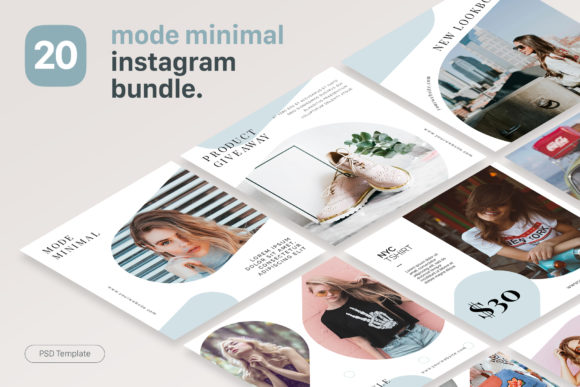
Establishing a cohesive visual identity on social media requires more than just good photography; it demands a systematic approach to design. For fashion retailers, lifestyle bloggers, and digital marketers, the Instagram Template - Mode Minimal serves as a foundational asset within a broader content production workflow. Unlike generic design tools that operate in a browser, this resource is built specifically for Adobe Photoshop CS6 and later versions. Understanding where this template fits into your operational process is essential for maximizing its value. It is not merely a collection of pretty layouts; it is a production tool designed to streamline the creation of high-quality, 1080 × 1080 px content while maintaining strict brand consistency.
The distinction between this PSD-based system and platforms like Canva is critical for professional users. While browser-based tools offer convenience, they often lack the precision, layer management, and typography control required for high-end editorial aesthetics. The Mode Minimal set bridges the gap between rapid content creation and professional graphic design standards. By integrating these 20 customizable templates into your existing Photoshop environment, you retain full control over color grading, smart object manipulation, and text hierarchy without sacrificing speed.
Pre-Production Planning and Asset Preparation
Successful implementation of the Instagram Template - Mode Minimal begins before you even open Photoshop. Because this template relies on Smart Objects for image replacement, your workflow efficiency depends heavily on how you organize your source assets. Professionals should treat the "Read First PDF" included in the download as a technical specification document rather than an afterthought. This file outlines the specific requirements for font installation and layer structure, preventing common friction points during the editing phase.
Before starting a batch of posts, curate and edit your photography to match the minimal aesthetic of the template. The clean layout of Mode Minimal exposes image quality issues that might be hidden in busier designs. Ensure your photos are cropped or composed with negative space in mind, as the template’s grid system relies on balance. Organizing your images into folders labeled by post type (e.g., quotes, product showcases, lifestyle shots) allows you to drag and drop assets into Smart Objects seamlessly. This preparation phase reduces the cognitive load during the actual design process, allowing you to focus on messaging rather than file management.
Technical Execution and Smart Object Workflow
The core utility of this template set lies in its non-destructive editing capabilities. When working within Adobe Photoshop, the Smart Object feature is the primary engine for customization. Instead of manually resizing and masking images for every new post, you simply double-click the Smart Object thumbnail, paste your prepared artwork, save, and close. The main composition updates automatically. This method ensures that all 20 templates maintain consistent alignment and resolution standards, which is vital for preserving the integrity of a minimalist grid.
Typography plays a significant role in the "Mode Minimal" aesthetic. The template includes links to high-quality free fonts, but integrating them requires attention to detail. Install these fonts prior to opening the PSD files to avoid missing font errors. Once loaded, the editable text layers allow for rapid copy adjustments. However, because the design is minimal, typographic choices carry more weight. Adjust tracking, leading, and opacity subtly to align with your specific brand voice. The organized layer structure facilitates this fine-tuning, making it easy to toggle visibility or adjust blending modes without digging through cluttered groups.
Quality Control and Resolution Standards
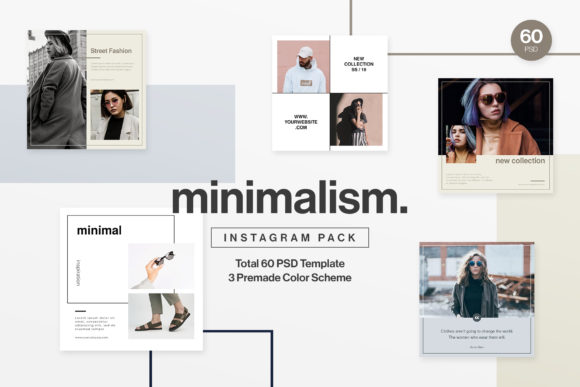
Maintaining technical quality is non-negotiable for professional accounts. The Instagram Template - Mode Minimal is configured at 1080 × 1080 px with 72 dpi in RGB color mode. These specifications are optimized specifically for screen display and Instagram’s compression algorithms. When exporting your final designs, adhere to these parameters to prevent pixelation or unwanted cropping. Using the template’s native settings acts as a built-in quality control checkpoint, ensuring that every piece of content meets platform standards before it reaches your scheduling tool.
Strategic Application Across Business Functions
This template set is versatile enough to support various stages of business and creative projects. Its application extends beyond simple daily posting, functioning as a visual anchor for campaigns, product launches, and educational content.
For Fashion and Retail Brands
In retail, visual consistency directly correlates with perceived brand value. Use the Mode Minimal templates to create a unified look for seasonal collections. The clean layout prevents visual competition between the template and the product photography. During a launch, you can pre-produce a series of announcement cards, detail shots, and testimonial graphics using the same underlying grid. This creates a recognizable rhythm in your feed that signals professionalism to potential customers. The ability to swap products via Smart Objects means you can adapt the campaign visuals instantly if inventory changes, keeping your marketing agile.
For Bloggers and Content Creators
Creators often struggle to balance content creation with community engagement. This template set functions as a time-saving mechanism that frees up mental energy for writing and interaction. Use the quote and text-heavy layouts to repurpose blog excerpts or podcast highlights into shareable graphics. The minimal design ensures readability on mobile devices, increasing the likelihood of saves and shares. Furthermore, because the files are standard PSDs, you can easily adapt the 1080px square format for Pinterest pins or blog headers by adjusting the canvas size, extending the utility of a single asset across multiple platforms.
For Educators and Service Providers
Clarity is paramount when communicating complex information. The structured nature of Mode Minimal provides a disciplined framework for educational carousels or service breakdowns. The ample whitespace helps guide the viewer’s eye through step-by-step processes or lists. By standardizing your educational content with these templates, you reduce the design barrier to entry, allowing you to publish valuable insights more frequently. This consistency builds trust and authority, as your audience learns to associate the clean visual style with reliable information.
Integration with Broader Marketing Ecosystems
The Instagram Template - Mode Minimal does not exist in a vacuum; it must interact smoothly with your other tools and resources. Understanding these integration points enhances overall workflow efficiency.
- Scheduling Platforms: Export your finalized PSDs as optimized JPEGs or PNGs compatible with tools like Later, Planoly, or Buffer. Since the template is already sized correctly, you eliminate the need for resizing within the scheduler.
- Brand Guidelines: Create a custom Photoshop Action or Color Swatch library based on your brand colors. Apply these to the Mode Minimal templates to ensure they align with your wider corporate identity, even though the template has its own default palette.
- Team Collaboration: If multiple team members manage your account, establish a naming convention for saved PSDs and exported files. The organized layers make handoffs easier, but clear file management prevents version conflicts.
- Analytics Review: Track the performance of posts created with this template versus other formats. The consistent variable (the template) allows you to isolate whether engagement changes are due to design, caption, or timing.
Long-Term Maintenance and Scalability
Adopting a premium template set is an investment in long-term visual infrastructure. To maximize ROI, treat the Instagram Template - Mode Minimal as a living system. Periodically review which of the 20 layouts generate the best engagement and retire those that do not resonate with your current audience. You can also duplicate and modify specific Smart Object configurations to create variations that feel fresh while retaining the core structural benefits.
Be mindful of software compatibility. As Adobe releases updates, verify that your Smart Objects and fonts remain functional. Keeping your source files organized in cloud storage ensures access across different workstations and protects against data loss. Additionally, remember that while the template handles layout, it does not replace the need for high-quality original photography. The "image not included" note is a reminder that the template is a vessel for your unique content, not a substitute for it.
Ultimately, the effectiveness of this tool depends on your commitment to the process. Basic Photoshop skills are required, but the learning curve yields dividends in speed and quality. By embedding the Instagram Template - Mode Minimal into your pre-production, execution, and analysis phases, you transform a static design asset into a dynamic engine for growth. This systematic approach allows professionals, creators, and business owners to elevate their Instagram presence without compromising on the operational efficiency needed to sustain it.