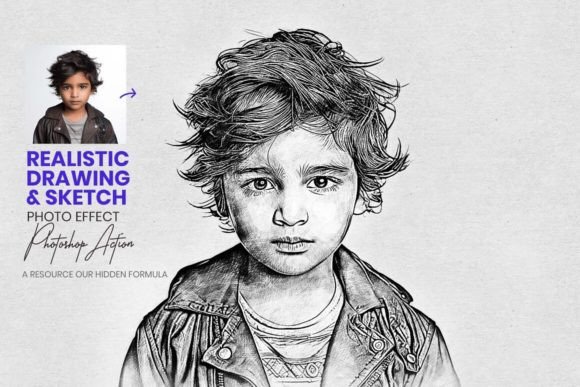
Realistic Drawing Sketch Effect: Transforming Digital Photos into Hand-Drawn Art
In the evolving landscape of digital design, the line between traditional artistry and modern technology continues to blur. While high-resolution photography and vector graphics dominate much of the visual web, there remains a profound appreciation for the organic, imperfect beauty of hand-drawn sketches. For designers, photographers, and content creators, achieving this aesthetic manually can be time-consuming and requires advanced illustration skills. This is where the Realistic Drawing Sketch Effect becomes an essential asset in the creative toolkit.
This Photoshop action is designed to bridge the gap between digital convenience and classical artistry. By automating complex layering and texturing processes, it allows users to elevate their digital artwork with a lifelike pencil sketch appearance in seconds. However, understanding how to leverage this tool effectively requires more than just clicking a button; it involves knowing when to use it, how to customize the editable layers, and what practical applications yield the best results for professional projects.
The Intersection of Automation and Artistic Control
The primary value proposition of the Realistic Drawing Sketch Effect Photoshop Action is its ability to democratize high-end artistic styling. Traditionally, converting a photograph into a convincing drawing required hours of manual masking, brush work, and texture blending. This action condenses that workflow into a seamless, one-click solution. Yet, unlike basic filters that flatten an image into a single raster layer, this tool prioritizes non-destructive editing.
Every layer generated by the action remains fully editable. This distinction is critical for professionals who cannot rely on "happy accidents." When you apply the effect, the system constructs a stack of adjustment layers, pattern overlays, and smart objects. This architecture gives you the flexibility to fine-tune opacity, contrast, and stroke density long after the initial transformation. Whether you need to soften the shading on a portrait or increase the graphite grit on an architectural rendering, the control remains entirely in your hands.
What Is Included in the Package
To maximize the utility of this effect, it helps to understand the specific components provided. The package is structured to support both novices and experienced retouchers:
- Photoshop .ATN Action File: The core automation script that executes the sketch conversion.
- Photoshop .PAT Pattern File: Essential texture data that simulates paper grain and pencil strokes, preventing the result from looking like a generic digital filter.
- 20 Unique Color Adjustments: Pre-set grading options that allow for monochromatic charcoal looks, sepia tones, or subtle color-infused sketches.
- Comprehensive Help Files: Well-documented instructions and step-by-step video tutorials ensure users can troubleshoot and master the tool without prior experience.
Practical Applications Across Industries
The versatility of the Realistic Drawing Sketch Effect extends far beyond personal art projects. Its ability to convey warmth, nostalgia, and human touch makes it valuable across various commercial and creative sectors.
Branding and Editorial Design
In an era of polished corporate minimalism, brands often seek ways to appear more approachable and authentic. Using a realistic sketch effect for website headers, about-page imagery, or editorial illustrations can soften a brand’s visual identity. For example, a coffee shop might use sketched portraits of their baristas instead of standard headshots to emphasize craftsmanship and community. The 20 included color adjustments make it easy to match the sketch tone to specific brand palettes, ensuring visual consistency while maintaining an artisanal feel.
Architectural and Interior Visualization
For architects and interior designers, photorealistic renders can sometimes feel sterile or intimidating to clients during early concept phases. Applying a pencil sketch effect to 3D renders or site photos helps communicate ideas as "works in progress," inviting client feedback rather than demanding approval. The textured patterns included in the action file mimic architectural tracing paper, adding a layer of professional credibility to conceptual presentations.
Social Media and Content Creation
Content creators constantly battle algorithm fatigue. Static, overly perfect images often receive less engagement than visuals that stop the scroll through unique aesthetics. Transforming standard lifestyle photography into artistic sketches can revitalize Instagram feeds, Pinterest boards, and blog thumbnails. Because the action is fast, creators can batch-process images for cohesive campaigns without spending days on post-production.
Evaluating Suitability: Strengths and Considerations
While the Realistic Drawing Sketch Effect is a powerful tool, it is important to manage expectations and understand its optimal use cases. No automated tool is a universal fix, and discerning when to use this effect is part of professional judgment.
Image Selection Matters
The quality of the output is heavily dependent on the input. Images with strong lighting, clear edges, and distinct subjects produce the most convincing sketches. Low-contrast photos or images with excessive noise may result in muddy details. Users should select source material with good tonal range to allow the action’s algorithms to accurately map shadows and highlights to pencil strokes.
Resolution and Performance
Because the action generates multiple layers and applies detailed patterns, working with extremely high-resolution files (e.g., 50MP+) may require significant system resources. For web-based projects, it is often more efficient to resize images to the target output dimensions before running the action. This ensures smooth performance and faster iteration times. Conversely, for large-format print projects, ensure your document resolution is sufficient to render the paper textures sharply.
Customization vs. Automation
A common pitfall for new users is accepting the default settings as final. The true power of this tool lies in customization. After the one-click generation, take time to explore the layer stack. Adjusting the blend modes of the texture layers or tweaking the levels adjustment can dramatically change the mood of the piece. The included video tutorials are invaluable here, demonstrating techniques for refining hair detail, enhancing eye clarity in portraits, or cleaning up background distractions.
Getting Started: A User-Friendly Workflow
One of the standout features of this product is its accessibility. You do not need to be a digital painter to achieve professional results. The workflow is designed to be intuitive:
- Preparation: Open your image in Photoshop and ensure the .PAT pattern file is loaded via the Preset Manager.
- Execution: Select the Realistic Drawing Sketch Effect action from the Actions panel and click play.
- Refinement: Once the action completes, review the generated layers. Use the provided color adjustment layers to set the desired tone.
- Fine-Tuning: Utilize layer masks to restore original photo details in specific areas (such as eyes or jewelry) if the sketch effect obscures them too heavily.
- Export: Save your work as a PSD to retain editability, or export to JPEG/PNG for immediate use.
The inclusion of well-documented instructions and help files ensures that even if you encounter issues, guidance is readily available. This reduces the learning curve significantly, making it possible to integrate the effect into production workflows immediately.
Enhancing Digital Creativity Without Compromise
Ultimately, the goal of any digital art tool should be to expand creative possibilities, not replace human creativity. The Realistic Drawing Sketch Effect Photoshop Action succeeds because it acts as a foundation rather than a cage. It handles the tedious technical aspects of simulating traditional media—the cross-hatching, the paper grain, the tonal mapping—so that artists and designers can focus on composition, storytelling, and emotional impact.
For business owners, this means faster turnaround times for marketing assets. For hobbyists, it means exploring new artistic styles without years of practice. For professionals, it means adding a versatile new technique to their repertoire. By combining ease of use with deep customizability, this action proves that efficiency and artistry are not mutually exclusive.
Whether you are looking to add a touch of classical elegance to a modern design or simply want to experiment with the timeless appeal of pencil on paper, this tool offers a reliable, high-quality pathway. Upgrade your digital art game today by embracing the fusion of traditional charm and modern innovation. With the right approach and a willingness to explore the editable layers, the Realistic Drawing Sketch Effect can transform ordinary photographs into extraordinary works of art that resonate with viewers on a deeper, more tactile level.